Calendar
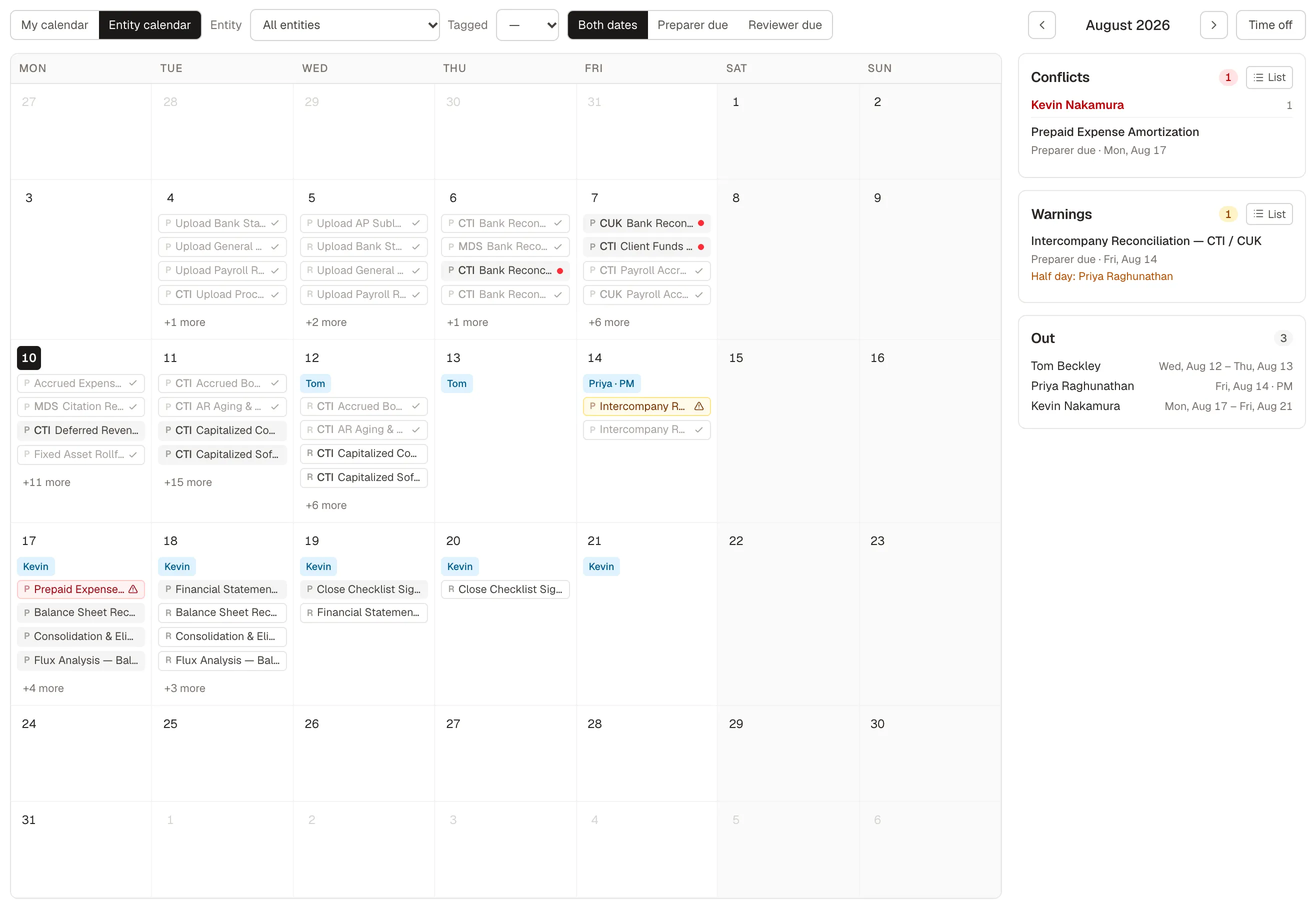
Calendar is a tab on the Close page. It shows the tasks on List by their due dates, with company holidays and people’s time off. Dates and people are changed on List.
Filters, column filters and the person picked are shared with List.
Toolbar
Section titled “Toolbar”| Control | Does |
|---|---|
| My calendar, Everyone | Your own work, or everybody’s. With more than one entity, Everyone is the entity’s calendar, such as Fund calendar, with an entity picker. |
| Person | On My calendar: whose work to show, or Whole team – time off. Type to search. |
| Tagged | Shows only tasks carrying the tag, with a pill for each of its values. Click a pill to leave its value out. |
| Both dates, Preparer due, Reviewer due | Which of a task’s dates to show. |
| ‹ › | The previous or next month. |
| My time off | Adds and removes your time off. With Manage the close team it reads Time off, and takes time off for anyone you see on the team. |
Clicking Calendar with no person, role or entity filter set opens it on your own work where the period has any. It opens on this month where this month has open work, otherwise on the month with the most.
Each day shows:
- each task due that day, marked P for the preparer’s date or R for the reviewer’s; one task run for several entities is one chip with a count;
- Holiday, with the holiday calendar’s name where it isn’t the company’s;
- FS due, with the entities whose statements are due, or their number past three;
- who is out, by first name, with AM or PM for a half day; past two, a count. On a person’s calendar, Out.
| Chip | Means |
|---|---|
| Red | Conflict. Everyone in one of the date’s groups (preparers, reviewers or second reviewers) is out for the whole day. On a person’s calendar, red means that person is out. |
| Amber | Warning: a weekend, a half day, or a reviewer date before the preparer’s. |
| ✓ | Done. |
| Red dot | Overdue. |
N/A tasks aren’t shown. Done tasks are grey with a ✓, and aren’t marked red or amber; nor is a preparer’s date once the task has gone on to review or its journal entry. Point at a chip for its entities, people and what is wrong. Click it to open the task, or the day where the chip has a count. Click a day to list everything due on it.
Side panel
Section titled “Side panel”| Card | Shows |
|---|---|
| The day picked | Its tasks, holidays and who is out. |
| Conflicts | The month’s conflicts, by who is out. |
| Warnings | The month’s warnings, each with what is wrong. |
| Out | Who on the work in view is out this month. |
List on the day, Conflicts and Warnings cards opens List on those tasks.
Whole team – time off
Section titled “Whole team – time off”Everybody’s time off and every holiday calendar on one grid, with no tasks. Where there are holiday calendars, pick one to see only its people. Click a name to open their calendar.
Time off and holidays
Section titled “Time off and holidays”Time off is entered by the person it belongs to, here or under Settings → You → Time off, as full days or a morning or afternoon. With Manage the close team, you can enter it on the calendar for anyone you see on the team.
The company’s holidays and other holiday calendars are under Settings → Close → Calendar. The company’s are changed with Change close settings or Plan a close; other holiday calendars with Change close settings. Someone on a holiday calendar keeps its holidays instead of the company’s. A holiday counts as a day out.
On List
Section titled “On List”List has a Conflicts column: what is wrong with each task’s dates, in the calendar’s words. A conflict or warning also colours the row’s left edge.