Managing periods
These steps need permission to start, close and reopen periods. To create the next period, see Rolling over tasks.
Open, close and reopen
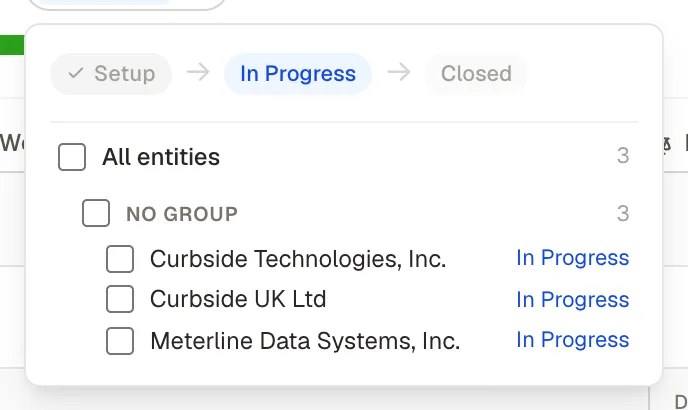
Section titled “Open, close and reopen”The stage control next to the period name shows each entity’s stage. Open its menu, select the entities, and choose:
| Action | Moves | Note |
|---|---|---|
| Open close | Setup → In Progress | Can’t be undone. |
| Close | → Closed | Seals the entities’ work. See below. |
| Reopen | Closed → In Progress | Needs a reason, kept in the period’s history. |
In Setup
Section titled “In Setup”A period in Setup is being planned. Its tasks can’t be worked until the entity is opened with Open close.
| In Setup you can | In Setup you can’t |
|---|---|
| Add and assign tasks | Start, submit or review a task |
| Set due dates and statement dates | Run an agent on a task |
| Mark a task N/A, and undo it | Draft a journal entry on a task |
| Change a task’s template and where its files are kept | |
| Put a file on a task or a reconciliation, or take one off | |
| Roll last month’s files forward from Files |
A task stays Not started when a file is put on it in Setup.
Where a task covers more than one entity, it can be worked once any of them is open. Due-date reminders aren’t sent for tasks in Setup.
Closing
Section titled “Closing”The Close dialog lists what is unfinished in each selected entity, and your organization’s close checklist, such as “Close in the ERP”. Close is available once every checklist item is selected and nothing unfinished holds the close. Your organization decides, in Settings → Close → Controls, whether every task must be Done or N/A, and every reconciliation approved, before an entity can close. The selected items are recorded in the period’s history and in the audit bundle.
A close is all or nothing: every selected entity closes, or none does. When it goes through, rolling over the closed entities into the next period opens straight away; see Rolling over tasks.