Workload
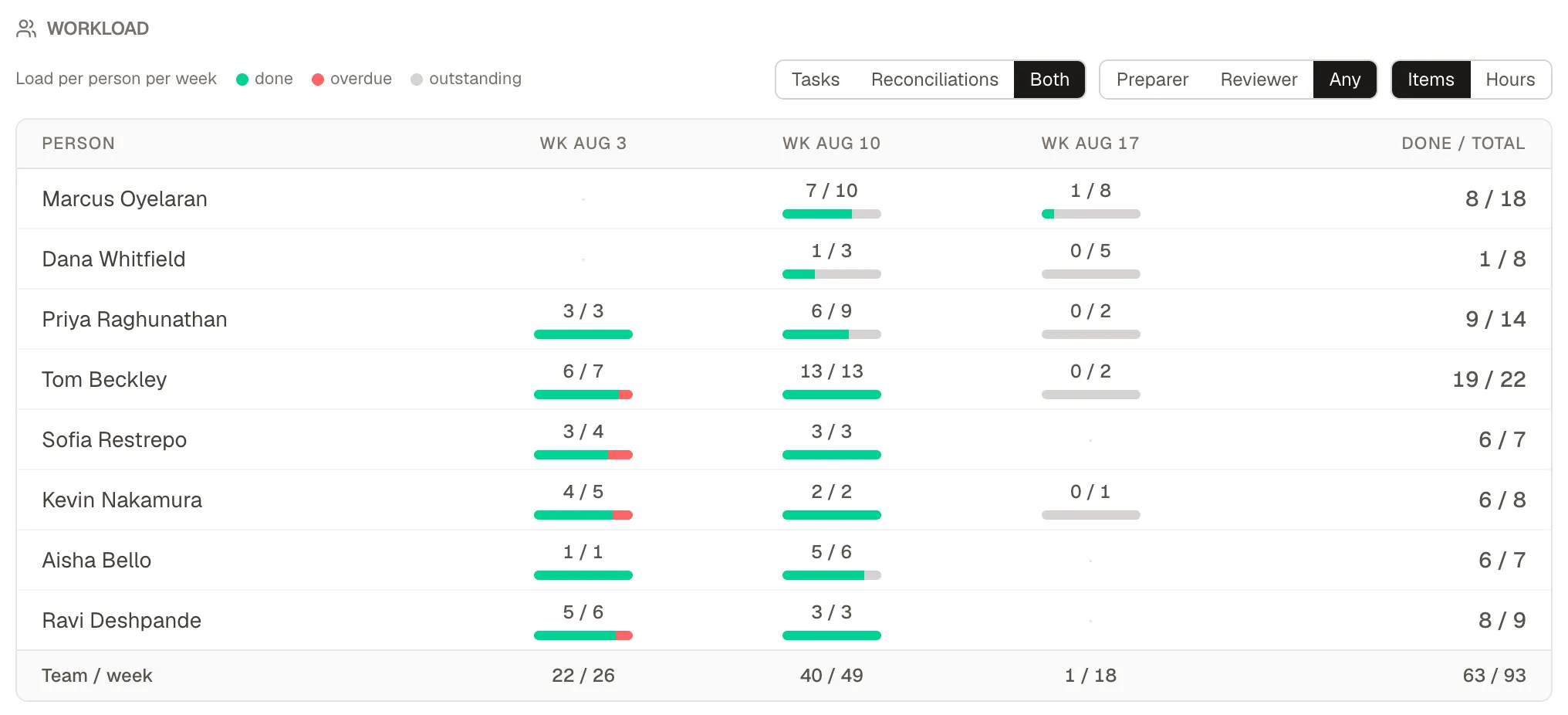
Workload is a tab on the Close page. It shows how much each person has due each week, and how much of it is done. Each name is a link to everything that person prepares or reviews.
What is counted
Section titled “What is counted”These are in the bar under the tabs.
| Control | Does |
|---|---|
| Type | Tasks, reconciliations or both; both is the default. The choice applies to Entities and Timeline too. |
| Preparer / Reviewer / Either | Either, the default, counts both sides: what a person prepares and what they review, each on its own date. Preparer or Reviewer counts one side. Reviewer includes second review. |
| Items / Hours | Counts by item, the default, or by time estimate. In hours, an item with no estimate counts as one. |
Each choice stays in the address. Everything under Filters narrows the grid too: group, entity, filter tag, person, role, whose turn and due. So do the counts above it; see Timeline.
A task with several people in a role counts in full for each of them.
Each side
Section titled “Each side”A task or reconciliation counts on each side against that side’s date:
| Side | Due date | Done once |
|---|---|---|
| Preparer | The preparer due date | Submitted for review |
| Reviewer | The reviewer due date, or the preparer due date where there is none | Done (a reconciliation’s Approved) |
Work with no due date isn’t shown; see Timeline for work missing a due date.
Each cell is done over total for that week, with a bar: green is done, red is overdue, grey is outstanding. Done / total at the right is the person’s whole period. Team / week at the bottom totals each week.
Open a person’s work
Section titled “Open a person’s work”Click a name to see everything that person prepares or reviews, from either side and with or without a due date. It opens on Reconciliations when all of it is reconciliations, otherwise on List. The person stays picked on both tabs, as Filters → Person; Role narrows it to one side. The person replaces a person or role already picked. Every other filter stays set: with Overdue on, a name opens that person’s overdue work.
A name with no account can’t be clicked.